
Assets
Know what equipment you have, where it is and when it runs out.
Asset records with warranties and network details, linked to the clients and tickets they belong to, with a NetBox export. For anyone who supports, sells or installs equipment and is tired of hunting for serial numbers.
- Asset records
- Warranty alerts
- Network details
- Assets on tickets and clients
- Reorder list and stock value
- NetBox export
Why it matters
The serial number is on a sticker under the desk, the warranty date is in an old email, and the IP address is in a technician's notebook. When a client calls about a failed switch, someone has to work out which one, whether it is still covered and whether there is a spare on the shelf. Warranties lapse unnoticed and stock runs out the week you need it.
-
Faster fixes
Technicians open a ticket and see the equipment involved, its model, serial, location and network details, without asking the client to read a label.
-
No surprise expiries
Warranties ending in the next 90 days are listed on the dashboard and can start a renewal follow-up automatically.
-
Stock and spend under control
See what you hold, what it cost, what it would sell for and what needs reordering before a job is held up.
How it works
-
Record your equipment
Add each product or device with its SKU, category, make, model, serial, location, supplier, cost, price and warranty. Choose bulk quantities or individual serial numbers.
-
Link it to the work
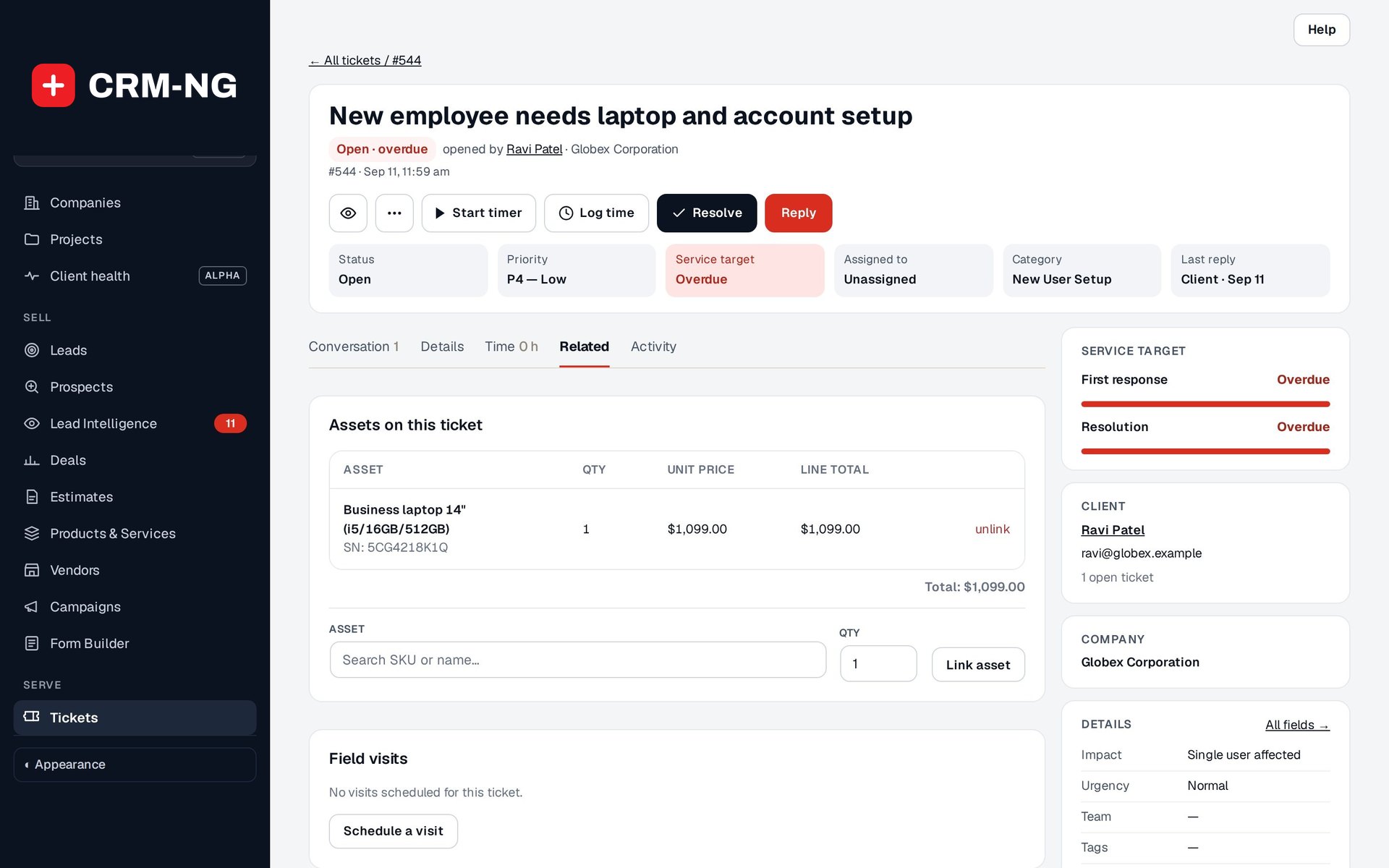
Attach equipment to the client, company or ticket it belongs to, and add it to a ticket's billing when parts are used.
-
Watch the dashboard
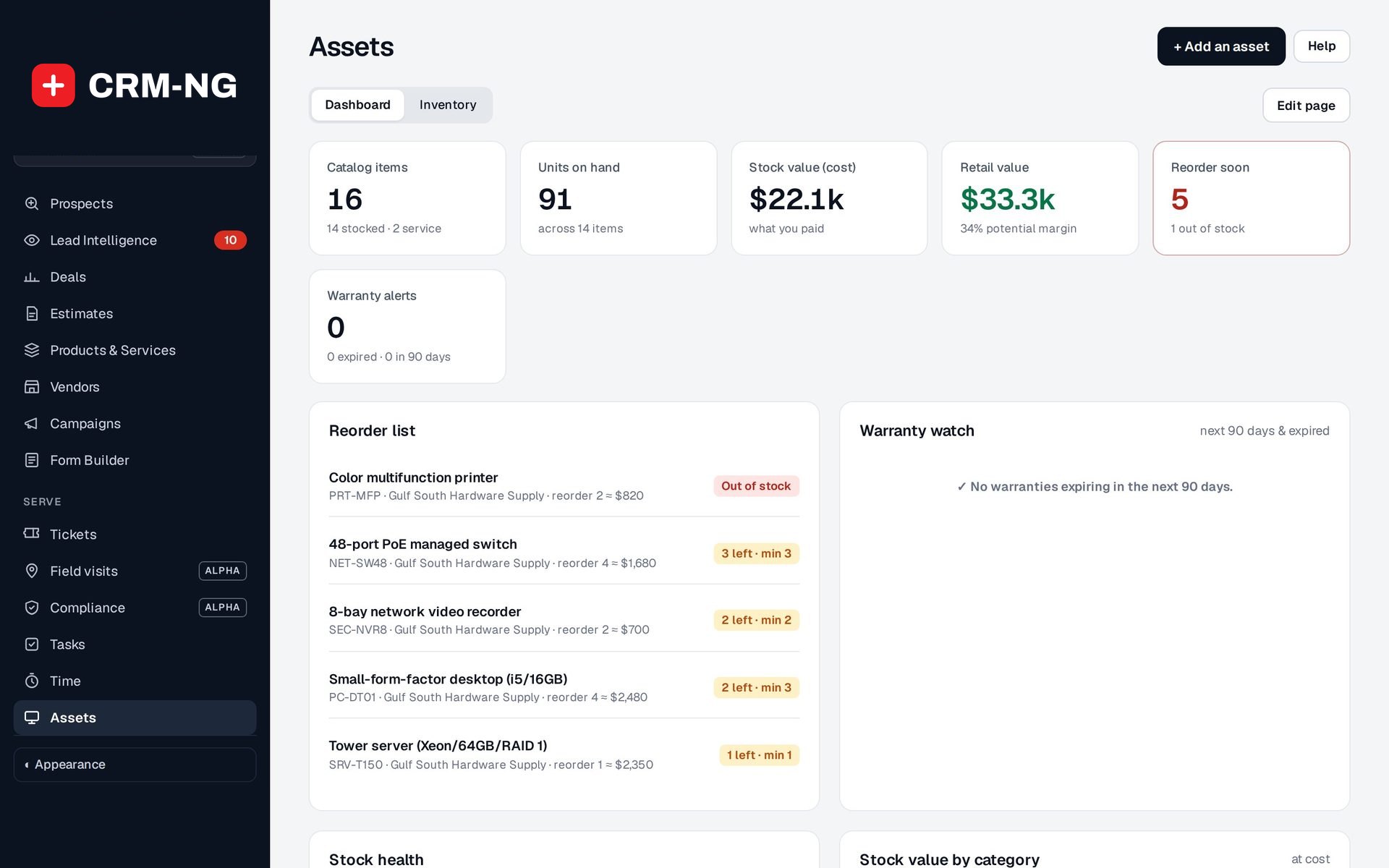
Stock on hand, stock value, items at their reorder level and warranties running out are always on the Assets dashboard.
-
Let follow-ups happen
A low-stock or warranty-ending event can start a workflow, such as creating a reorder task or telling the account manager.
What Assets does
IT providers and anyone who looks after equipment.
-
Everything recorded
Make, model, serial, location, owner and the client it belongs to.
- SKU, category, manufacturer, model, part number, barcode and asset tag
- Condition, location, purchase date and warranty end
- Usual supplier picked from your vendors, with cost and selling price
- Bulk quantities for consumables, or individual serial numbers for devices
-
Warranty watch
See warranties expiring in the next ninety days.
- Warranty alerts tile with expired and next-90-days counts
- A Warranty watch list on the dashboard
- A warranty-ending trigger for workflows, for example renew or replace 30 days ahead
-
Network details
Hostnames, addresses and rack positions for the equipment that needs them.
- Hostname, IP address, MAC address and platform
- Site, location, rack, position, face and height in rack units
- Parent device for parts inside another device, power draw and weight
-
On the ticket
Link the equipment involved to the ticket, and see its history.
- An Assets on this ticket card, with the quantity and price used
- The price is kept as it was when added, even if the catalogue price changes later
- Each asset shows the tickets and records it is linked to
-
Find anything fast
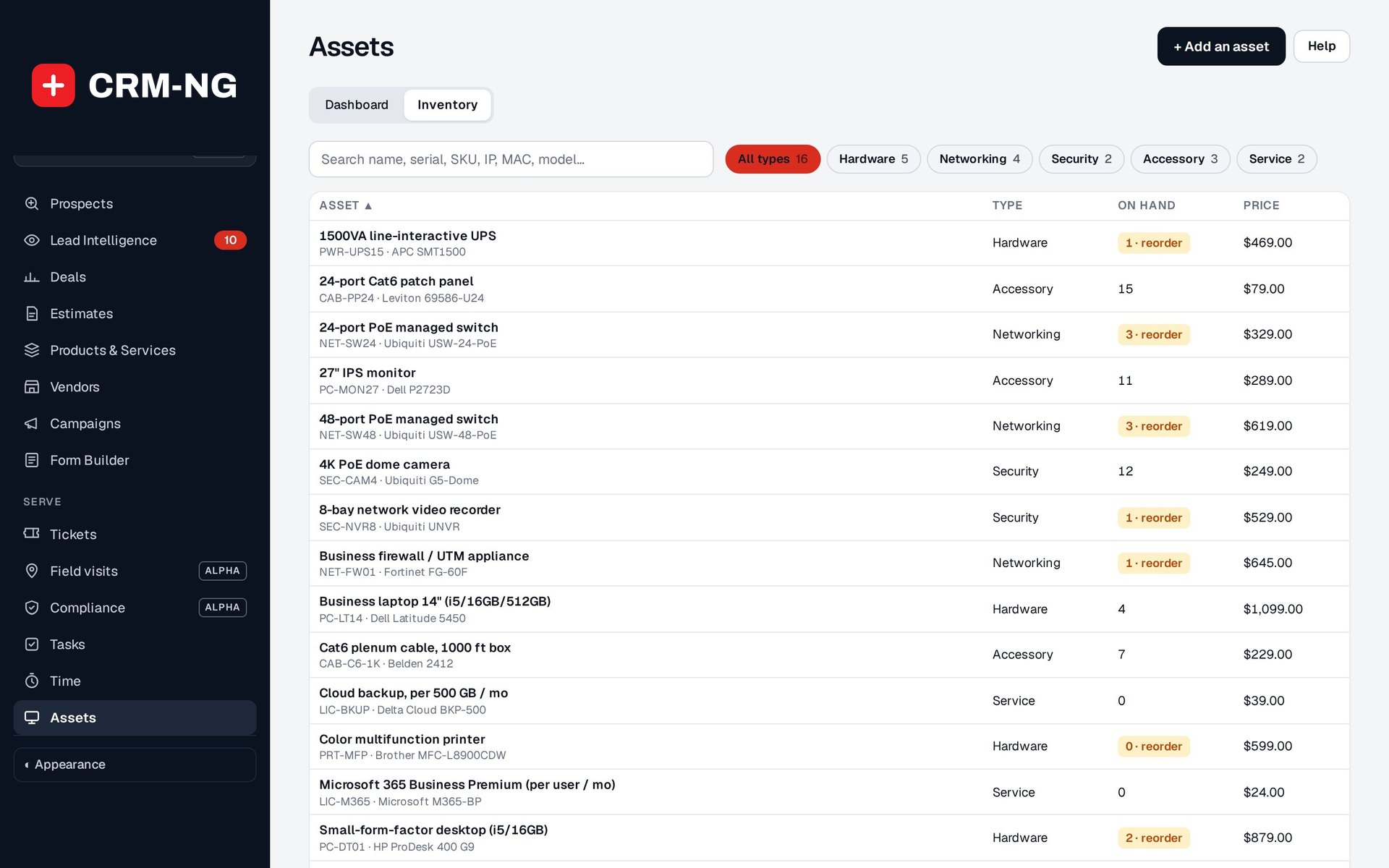
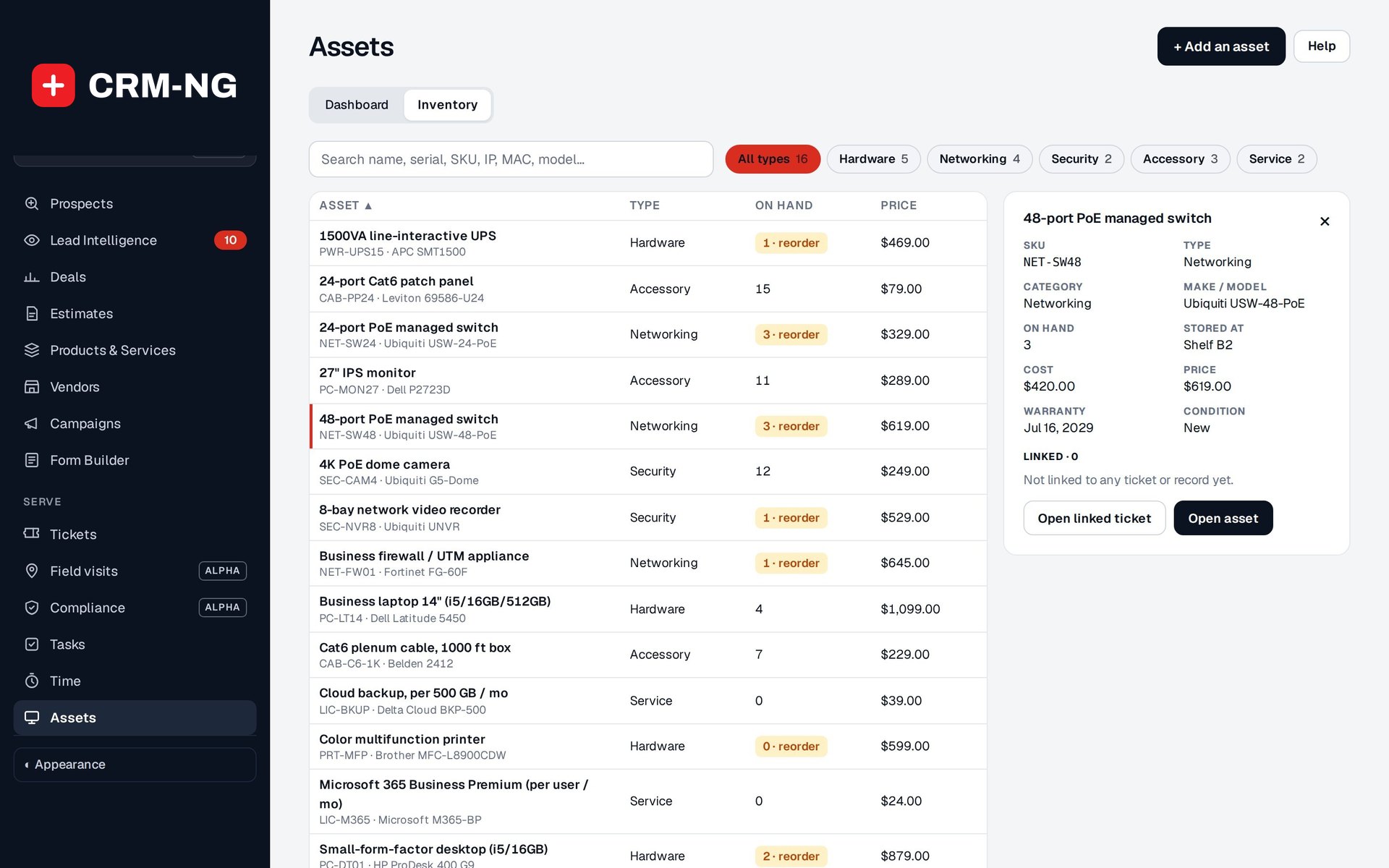
One search box on the Inventory screen finds equipment by any detail.
- Search by name, SKU, serial, tag, MAC address or model
- Filter chips by type, with counts
- Pick a row to see its facts, warranty warning and linked tickets in a side panel
-
Stock at a glance
Value, units on hand and what is due for reorder.
- Catalogue items, units on hand, stock value at cost and retail value
- A reorder list with supplier, quantity to order and approximate cost
- Stock health and stock value by category
-
Stock moves with invoices
Adding stocked equipment to an invoice takes it out of stock, and removing it puts it back.
- Low-stock warnings when a line would take an item below its reorder level
- Purchases of stocked products can add to stock on hand
-
NetBox export
Send your inventory to NetBox when you need it there.
- Role, status, tenant, site and rack fields on each asset
- Export from the Assets screen, set up under Assets and NetBox settings
See it in action
Who it is for
-
An IT provider or MSP
Keep every client's firewalls, switches, servers and laptops with serials, IP and MAC addresses and rack positions, see the device on each ticket, and renew warranties before they lapse.
-
An audio-visual or security installer
Track cameras, recorders and displays from the shelf to the client site, and know what was fitted where when a call comes in.
-
A trades or field business
Keep spare parts and tools on a reorder list, bill parts used on a job, and know what each van or site is holding.
-
Any office with equipment to look after
Record company laptops and phones, who has them and when their warranty ends, and get them back when someone leaves.
Works with the rest of CRM-NG
- Inventory
Inventory adds individual serial-numbered units to an asset, so each unit can be tracked in stock or out at a client.
- Service Desk
Equipment is linked to tickets and billed from them, and stock comes off the shelf when it is used.
- Documentation Vault
Vault items such as licences and passwords can point at the device (and serial unit) they belong to, and warranty dates appear alongside other expiring items.
- CRM
Assets are linked to the clients and companies that own them and show up in global search.
Questions
Should I store device passwords on the asset?
No. Keep credentials in a proper credential store such as Vault, and link the vault item to the device instead.
Can I track items that do not have serial numbers?
Yes. Interchangeable items such as cables and consumables are tracked as a simple quantity with a reorder level.
Does it sync both ways with NetBox?
It exports your inventory to NetBox. Two-way synchronisation is not offered; check a sample export against your NetBox fields before a large transfer.
Can I tell bulk stock and individual devices apart?
Yes. Each item is either a simple quantity or, with Inventory, a set of serial-numbered units that are tracked one by one.
Does it track equipment given to staff?
With HR switched on, equipment assigned to employees is tracked, including what needs to be returned when someone leaves.
See Assets running on your own data.
Every module runs on CRM-NextGen Cloud: we set it up and run it for you. Beta members get the first invites and hear pricing first.