
Live Notifications
The right person hears about it, in the place they look.
A notification bell and page, chat channels such as Slack and Teams, phone push, and approvals you can answer straight from the message. For teams that live in chat, on their phones or on the road.
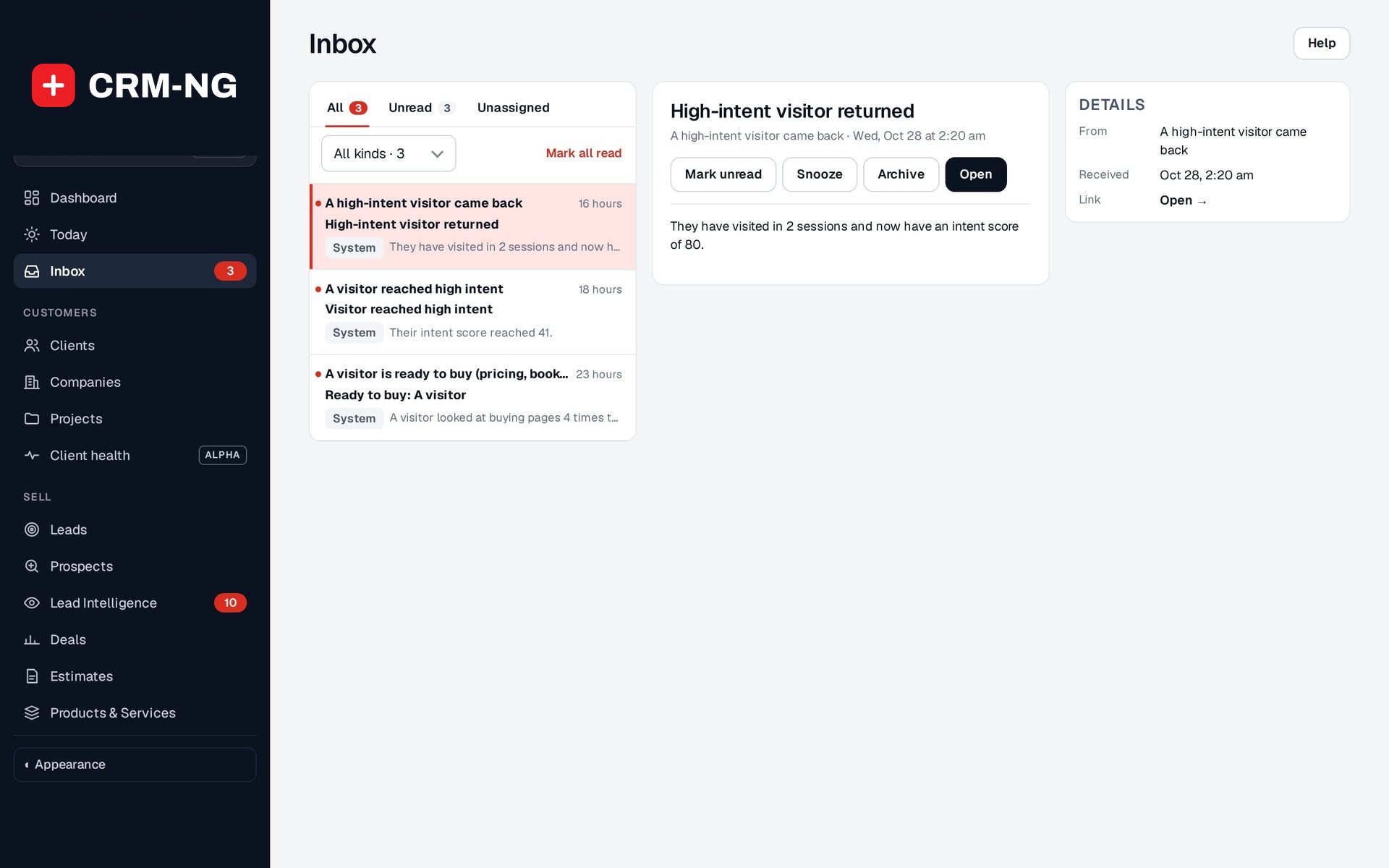
- The bell and notifications page
- Slack, Teams, Google Chat, Discord
- Phone push notifications
- Approve from email
- Instant, daily digest or none
- Notification actions for workflows
Why it matters
Important things happen inside the system, but people are elsewhere: in Slack, in Teams, on a client site with only their phone. A lead waits an hour because nobody saw it come in, a leave request sits unanswered, a client's account slips and the account manager hears about it last. Meanwhile, the people who do get alerts get too many of them.
-
Nothing waits unseen
New leads, approvals and warning signs reach the person responsible straight away, on the bell, by email, in chat or on their phone.
-
Decisions without logging in
Approvers can approve or reject from the email itself, so requests are decided in minutes rather than days.
-
Less noise
Each person chooses instant email, one daily summary or none, and each chat channel receives only the events you route to it.
How it works
-
Connect your channels
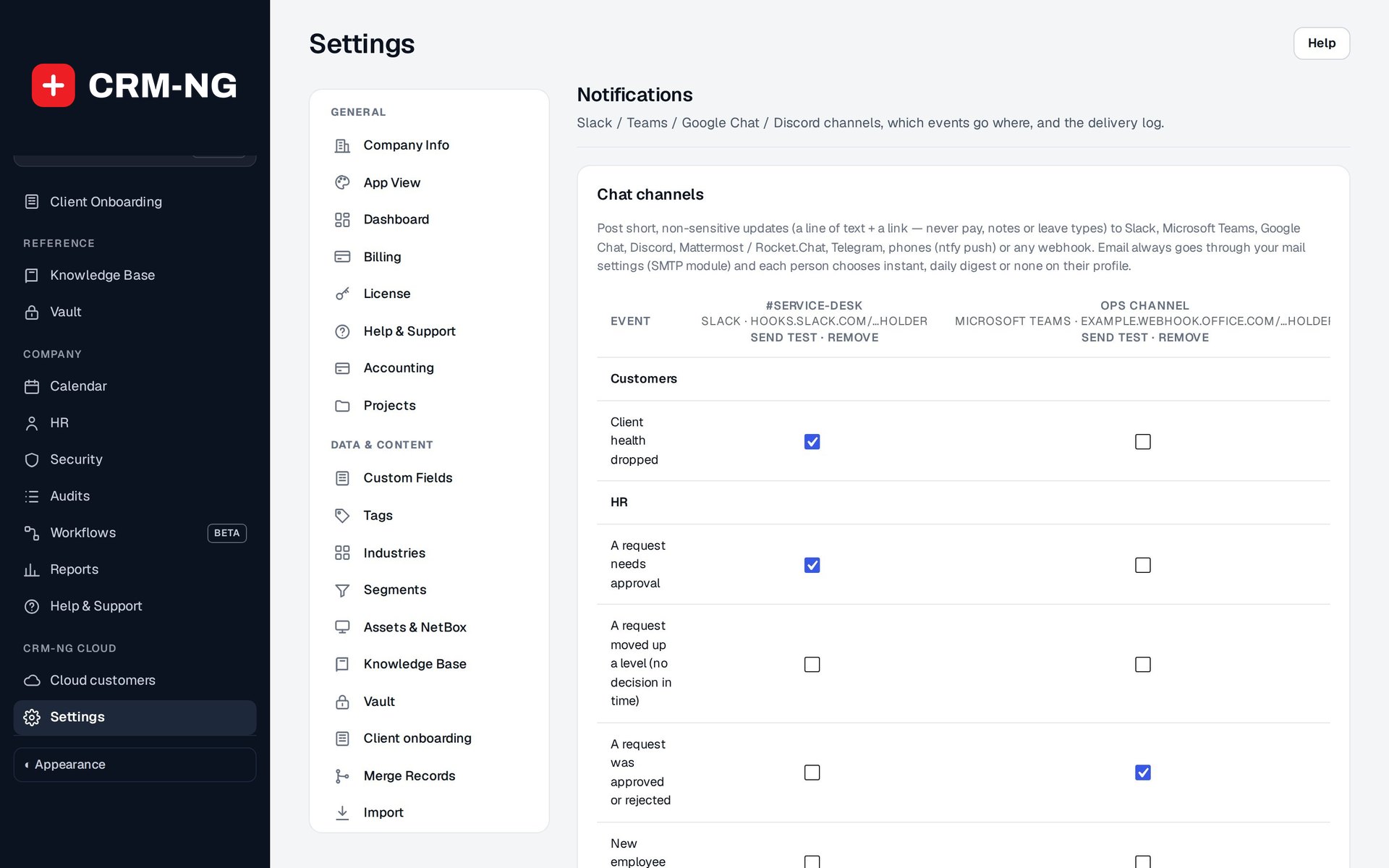
Paste the incoming-webhook address for a Slack, Teams, Google Chat, Discord, Mattermost or Rocket.Chat channel, a Telegram bot, an ntfy push topic or any webhook, then send a test.
-
Route events
Tick which events go to which channel in one grid, for example new leads to #sales and escalated approvals to #hr.
-
Let people choose
Everyone picks how they get email: right away, one daily summary, or in-app only.
-
Add notifications to workflows
Use Notify people or Post to a chat channel in any workflow to alert exactly who needs to know.
-
Check what was sent
The delivery log shows every message, where it went, for which event and whether it was sent or failed.
What Live Notifications does
Teams that live in chat or on their phones.
-
The bell
Everything that needs you, as it happens, without refreshing.
- An unread count and the latest items, one click from anywhere
- A full notifications list with Mark all read
- Menu badges such as Inbox refresh on their own every half minute
- A reminder of how many requests are waiting for your approval
-
Chat channels
Post updates to Slack, Microsoft Teams, Google Chat, Discord or any webhook.
- Also Mattermost, Rocket.Chat and Telegram
- No app to register: each service's own incoming webhook
- Send test for each channel, and Remove when it is no longer needed
- Messages are a short line and a link, never pay, private notes or leave types
-
On your phone
Push notifications through ntfy, free and self-hostable.
- Install the free ntfy app and subscribe to a hard-to-guess topic
- Use ntfy.sh or your own ntfy server
- Tapping the notification opens the record; hot leads are sent at high priority
-
Approve where you are
Approve or reject requests from the email itself.
- Each link is signed for one approver and one request
- It opens a confirmation page, so nothing is approved by accident
- Links expire after seven days and stop working once the request is decided
-
Your choice
Each person picks instant, daily digest or none.
- Email me right away, One daily summary email, or No email (in-app only)
- Urgent notifications are emailed right away even to digest users
- Requests waiting for your approval are emailed right away unless you chose no email
-
Routing grid
Decide which events reach which channel in one table.
- Events grouped by area, one column per channel
- HR: approvals needed, escalated and decided, new employees, leavers, overdue training, expiring documents
- Sales and clients: a lead assigned to me, a lead waiting past the speed-to-lead target, a quote accepted or declined in the portal, client health dropped
-
From workflows
Any workflow can notify a person or a channel.
- Notify people (bell and email): people from the event, such as the ticket's assignee, plus anyone you name
- Post to a chat channel with your own message
- Mark a notification urgent to skip the daily digest
-
Delivery log and security
See every delivery and keep channel addresses safe.
- When, via, to, event and sent or failed for each message
- Webhook addresses are stored encrypted and shown masked
- Chat addresses must be https on the service's own webhook host
Who it is for
-
An IT provider or MSP
Post escalated critical tickets to the on-call channel, push urgent alerts to technicians' phones and keep the service desk lead informed without them watching a dashboard.
-
A professional-services firm
Tell the right partner the moment a new lead is assigned or a client accepts a quote, and let managers approve leave from their inbox between meetings.
-
A trades or field business
Staff in vans get push notifications on their phones instead of having to log in, and the office sees everything in one Teams or Slack channel.
-
A growing team of any kind
Give each person the level of email they want, and send the noisy updates to a chat channel instead of everyone's inbox.
Works with the rest of CRM-NG
- Workflow
Adds the Notify people and Post to a chat channel actions, so any workflow can alert a person or a channel at the right step.
- Service Desk
Workflows on ticket events, such as an unassigned critical ticket or an SLA due soon, can notify the assignee or post to the team's channel.
- HR
Approvers are notified of requests with approve and reject links, employees are told the outcome, and escalations and expiring documents reach HR.
- CRM
Lead assignments, unanswered leads and client health drops are sent to the people who own those clients.
Questions
Is private information sent to Slack or Teams?
No. Chat and push messages are kept to a short line and a link back into the system, never pay, private notes or leave types.
Does phone push cost anything?
It uses ntfy, a free app. You can use the public ntfy.sh service with a hard-to-guess topic, or run your own ntfy server.
Can people turn off the emails?
Yes. Each person chooses instant email, one daily summary or no email. They still see everything on the bell.
Do I need a Slack or Teams app?
No. Each channel uses the service's own incoming webhook, which you create in Slack, Teams, Google Chat or Discord and paste in.
How do I know a message actually went out?
Every channel has a Send test link, and the delivery log records each message with sent or failed.
See Live Notifications running on your own data.
Every module runs on CRM-NextGen Cloud: we set it up and run it for you. Beta members get the first invites and hear pricing first.